How to add Snap Scroll feature in Webflow?
Step #1
Copy the Snap Scroll <script>
Copy the script and paste it into the </body> tag of the particular page. You can do so by clicking on
- Pages on the left navigation or, by tapping (P) on your keyboard
- Select the settings icon beside the page you want to add the script in
- Scroll down, you will see a section called Before </body> tag
- Paste it here

Step #2
Set Custom Attributes
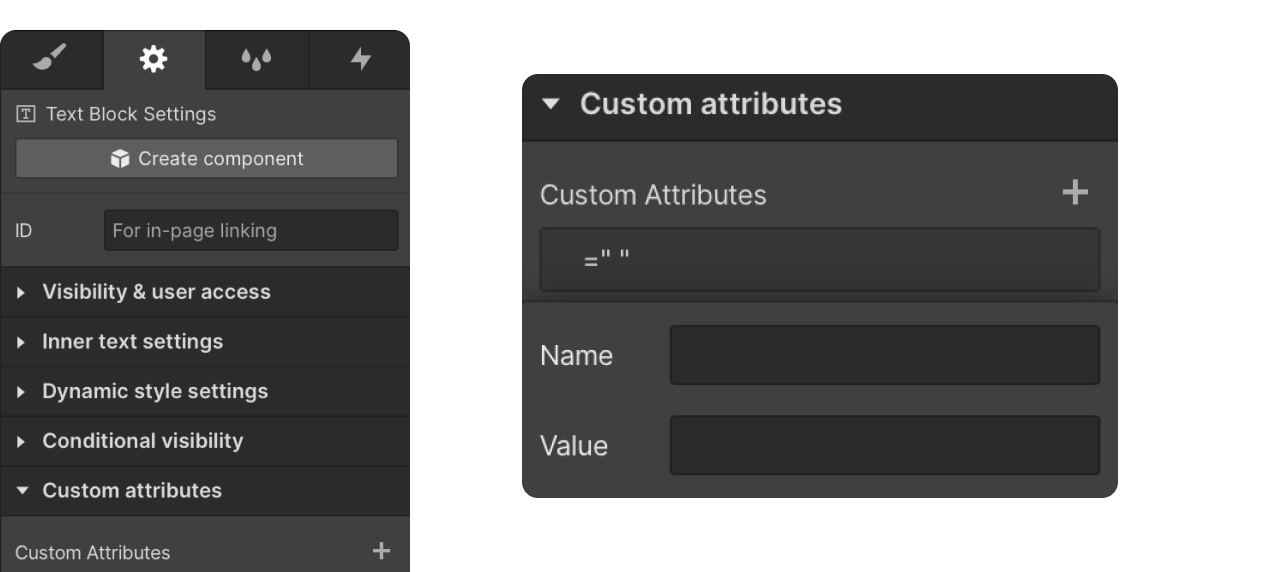
You will need to add attributes to 2 elements on the page. One is for the parent element & one for the children element.
- Parent: Add the attribute name of n-parent to the parent element (this is the element that holds all the children element that you want to experience this snap scrolling effect)
- Children: Add this attribute to the n-snap to any element inside the parent that has the attribute name of n-parent.
Step #3
Publish your site
It's highly recommended to publish your site on staging environment to make sure the script is working. Once you have confirmed it, you can publish it to your main domain.
Scroll Snap Not Working? Quick Fixes
Webflow scroll snap issues checklist:
- Enable scroll snap on parent container
- Set child snap alignment correctly
- Remove conflicting overflow/smooth scroll
- Check Designer interaction conflicts
Browser compatibility: Safari and Firefox may require certain prefixes.
Common fixes: Disable Webflow Designer animations, verify index stacking, test in published site vs. preview mode.
Smooth Scroll Snap Integration Guide
Combining smooth scroll snap for better user experience:
Lenis Integration: Add Lenis library to your site, adjust scroll speed settings, then enable scroll snap for smooth section transitions.
GSAP Example: Use GSAP ScrollTrigger for scroll snap smooth animations that glide between sections instead of jumping instantly.
Comparison Demo:
- Native scroll snap: Fast snapping, no extra code needed
- Smooth scroll snap: Gentle easing effect, better feel, requires adding a library

